Seating often seems like a simple task during event preparation: assigning people to tables or seats. That is, until multiple stakeholders become involved, VIPs need to be placed appropriately, accompanying guests should be seated together, and last-minute changes arise.
To address these challenges, doo offers different seating solutions, ranging from a pragmatic Excel-based table assignment approach to a visual tool for more complex seating requirements.
When a visual seating tool makes sense
Not every event requires the same type of seating solution. In some cases, an Excel list connected to doo is sufficient. However, as soon as multiple people are working on the seating plan, placements require closer coordination, or a graphical interface adds real value, a visual seating plan becomes the better choice.
Typical examples include gala dinners, award ceremonies, conferences, and other event formats where seating logic, guest groups, and ongoing changes need to be actively managed. Instead of working with lists, attendees can be assigned directly to tables or seats, making relationships immediately visible and simplifying decision-making throughout the process.
The visual doo Seating Tool at a glance
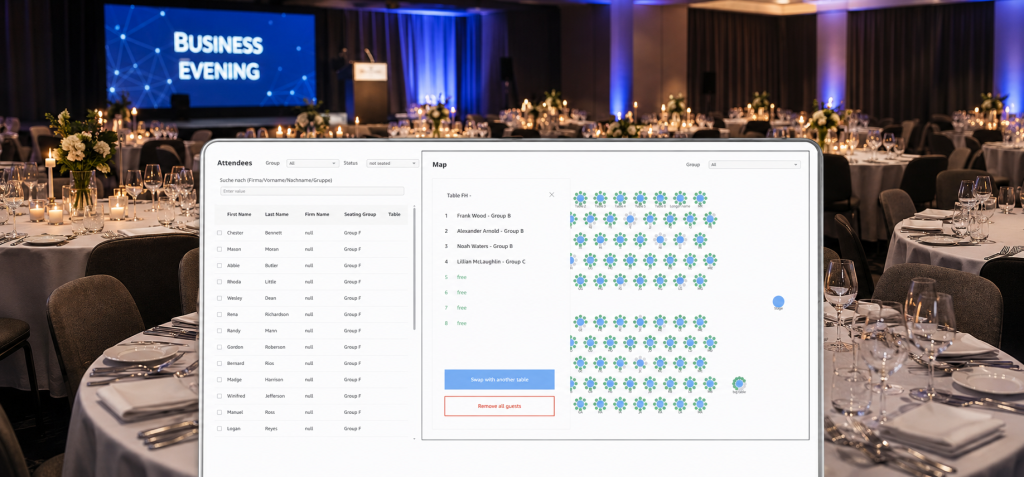
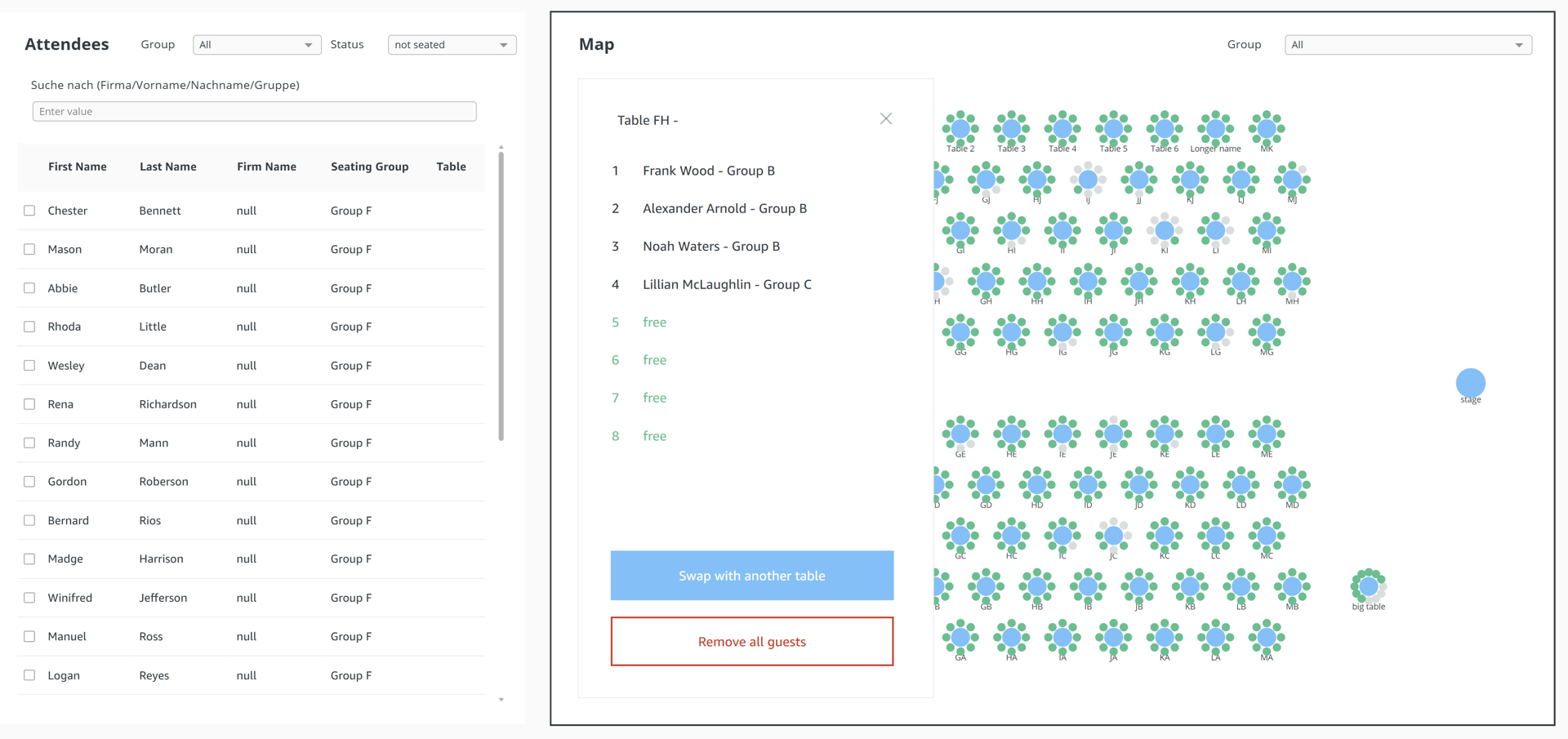
The visual doo Seating Tool enables you to manage seating arrangements directly within a graphical interface. Attendees can be placed, moved, or regrouped on an interactive table and seating map. This makes it easy to see at a glance which seats are occupied, which groups are seated together, and where adjustments are still needed. Depending on the setup, the tool is suitable for events with up to approximately 2,250 attendees.
Regardless of the specific deployment model, the tool is built around the same core functionalities:
- Interactive placement: Attendees can be assigned to tables or specific seats with a click and quickly repositioned when needed.
- Up-to-date data: Thanks to direct integration with doo, active registrations and bookings are available within the seating process as up to date as possible.
- Filters, search, and lists: Guests can be searched, filtered, and viewed in individually configurable lists.
- Advanced seating logic: Accompanying guests, bookings, attendee groups, and seating groups can be considered. Depending on the setup, automated placements based on defined criteria such as segment, ticket category, attributes, or groups are also possible. Multiple doo events and sessions can be managed within a single seating plan if required.
- Efficient adjustments: Individual guests, groups, or entire tables can be moved, cleared, or swapped. Seating assignments can even be updated shortly before the event begins.
- Embedding: If required, the Seating Tool can be embedded in a page provided by doo or on your own website.
- Collaborative planning: Multiple stakeholders can work on the seating plan simultaneously.
- Export and operational use: Seating data can be exported and subsequently used for name badges, check-in processes, table plans, or the event app.
Two deployment models for the visual tool
The visual Seating Tool can either be configured specifically for a single event or set up as a reusable solution for similar events and sessions.
Setup for a single event
For particularly sensitive or highly specific events, doo can configure the visual tool exclusively for that event, tailored to the venue layout, table structure, and seating requirements.
In this model, the solution is individually configured and prepared by doo for the event in question. This makes it possible to accommodate special requirements, such as:
- Role-based visibility: Different user groups only see the sections of the seating plan that are relevant to them.
- Check-in status highlighting: Guests’ attendance status is displayed directly within the seating plan.
- Menu information: Catering preferences can be taken into account during seat assignment.
- On-site display mode: The seating plan can be used for orientation and navigation on the day of the event.
Reusable setup for recurring event formats
For recurring formats such as conferences, annual meetings, or event series, the tool can be configured for long-term use. This is particularly beneficial for events where floor plans, processes, or seating logic remain similar over time.
The initial setup is tailored to the specific requirements but designed with reusability in mind. Once configured and introduced through training, the tool can be used independently by internal teams.
- Reusable configuration: Venue layouts, seating rules, attendee logic, and access rights remain available for future events.
- Flexible placement modes: Attendees can be assigned by zone, by individual seat, or alternatively all at once with a one-click placement option and adjusted later if needed.
The major advantage of this deployment model is scalability. A well-configured setup saves time at recurring events, reduces coordination effort, and provides greater independence in day-to-day operations.
When is the basic solution enough?
A visual tool is not necessary in every situation. If attendees only need to be assigned to tables and no graphical seating interface is required, the doo basic solution based on Excel may be entirely sufficient.
In this setup, seating assignments are managed through an online shared Excel file synchronized with doo. Table assignments are made via dropdown menus, attendee data updates are reflected accordingly, and cancellations remain visible and traceable. For smaller events or straightforward table allocation scenarios, this is often the fastest and most practical way to create a reliable seating structure.
What all seating solutions have in common
Regardless of the chosen solution, doo ensures that seating arrangements are managed in a structured way based on current attendee data, rather than being isolated across multiple files and coordination loops.
- Reduced manual effort: Attendee data, booking changes, and seating information no longer need to be manually reconciled across various lists, tools, and stakeholders. This is especially helpful during the critical final preparation phase before an event.
- Greater planning reliability: Standardized assignments, up-to-date data, and clearer capacity overviews reduce the risk of overbooking, outdated information, or incorrect seat allocations.
- Improved operational usability: Assigned tables and seats can be reused in downstream processes, such as name badge printing, check-in displays, table plans, or the event app.
- Easier collaboration: Depending on the solution, internal teams, departments, or external stakeholders can be involved in a controlled manner, without the seating process becoming scattered across multiple file versions.
- Flexibility for different event requirements: From simple table assignments to more complex seating scenarios, the right solution can be tailored to the event format, team structure, and desired level of control.
Which seating solution is right for your events?
Whether you need a simple table assignment process or a visual tool for managing more complex seating requirements, doo offers solutions that fit different event formats, team structures, and planning needs.
Would you like a demo of our visual Seating Tool or advice on which solution best fits your setup? Feel free to contact your doo representative or reach out to our Support Team.