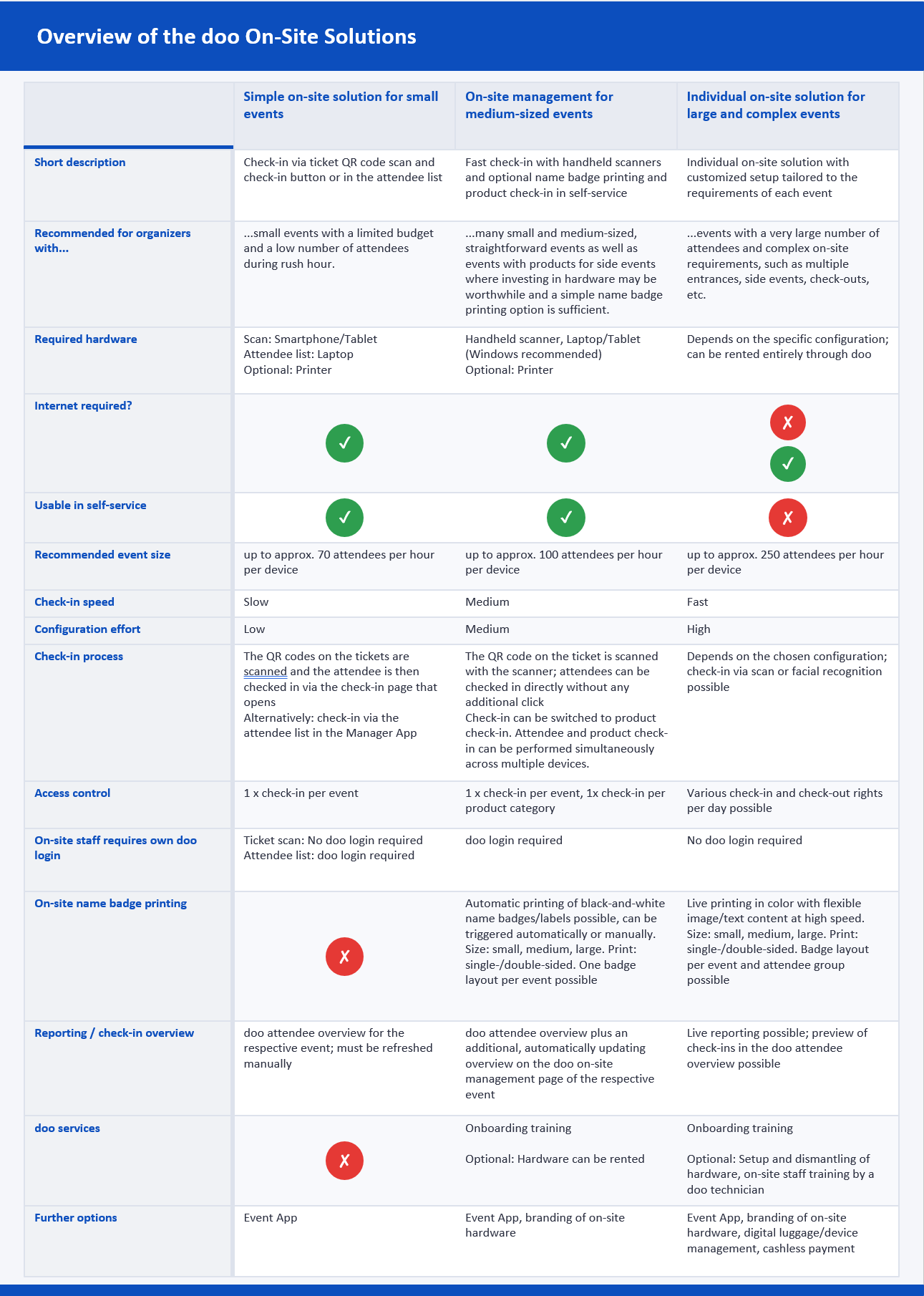
Overview of the doo On-Site Solutions
At doo, you have several solutions available to manage access control on the day of your event.
1. Simple On-Site Solution for small events
For simple events with only a few attendees, you can easily handle the check-in yourself using your own smartphone or tablet. Simply scan your attendees’ tickets at the entrance with your device and validate them with a single click on the check-in page.
Alternatively, you can check in attendees directly on your laptop via the doo attendee overview. There, you will also find a summary of the number of check-ins and can export the attendee list.
You can find all details and tips for this access-control option in our article on check-in for small events.
2. doo On-Site Management for medium-sized events
For event organizers who regularly run small to medium-sized events, doo On-site Management provides a fast and efficient way to check in large numbers of attendees within a short period of time. This requires handheld scanners, which can either be purchased or rented. By scanning tickets, they can be immediately validated and redeemed. Optionally, the scan can also trigger the automatic printing of a name badge. Within doo On-site Management, you can always see how many attendees are still expected and how many have already been checked in. Check-in data is subsequently available in the Attendee Overview and can be exported from there.
In addition, On-site Management can be switched to product check-in mode. This enables attendee tickets to be scanned again during the event, for example at the entrance to a workshop, in order to verify that the attendee has a valid booking for the corresponding product. All information about doo On-site Management can be found in the on-site article for medium-sized events.
3. Custom On-Site solutions for large events
For large events with more than 500 attendees, for events with sub-events requiring repeated ticket checks, or for other more complex access control setups—such as turnstiles, on-site badge printing, and more—we offer tailored solutions.
If you are interested in a custom on-site setup, please contact your doo representative or email us at upgrade@doo.net.
The following table gives you an overview of the available on-site solutions.